

When you move crypto across chains, you want to know where your funds are going and what protects them along the way. That matters whether you are bridging USDC to a new network or combining balances from several chains to enter a DeFi position.
At Avail, we built FastBridge to make those transfers easier to complete and easier to understand. FastBridge is powered by Avail Nexus, our coordination layer for connecting assets and applications across blockchains. Nexus handles the cross-chain execution and settlement behind the interface.
FastBridge’s security starts with its non-custodial design. In the native Avail Nexus flow, your source funds enter on-chain escrow, a solver delivers the destination funds, and verified settlement authorizes reimbursement from source funds.
FastBridge security at a glance
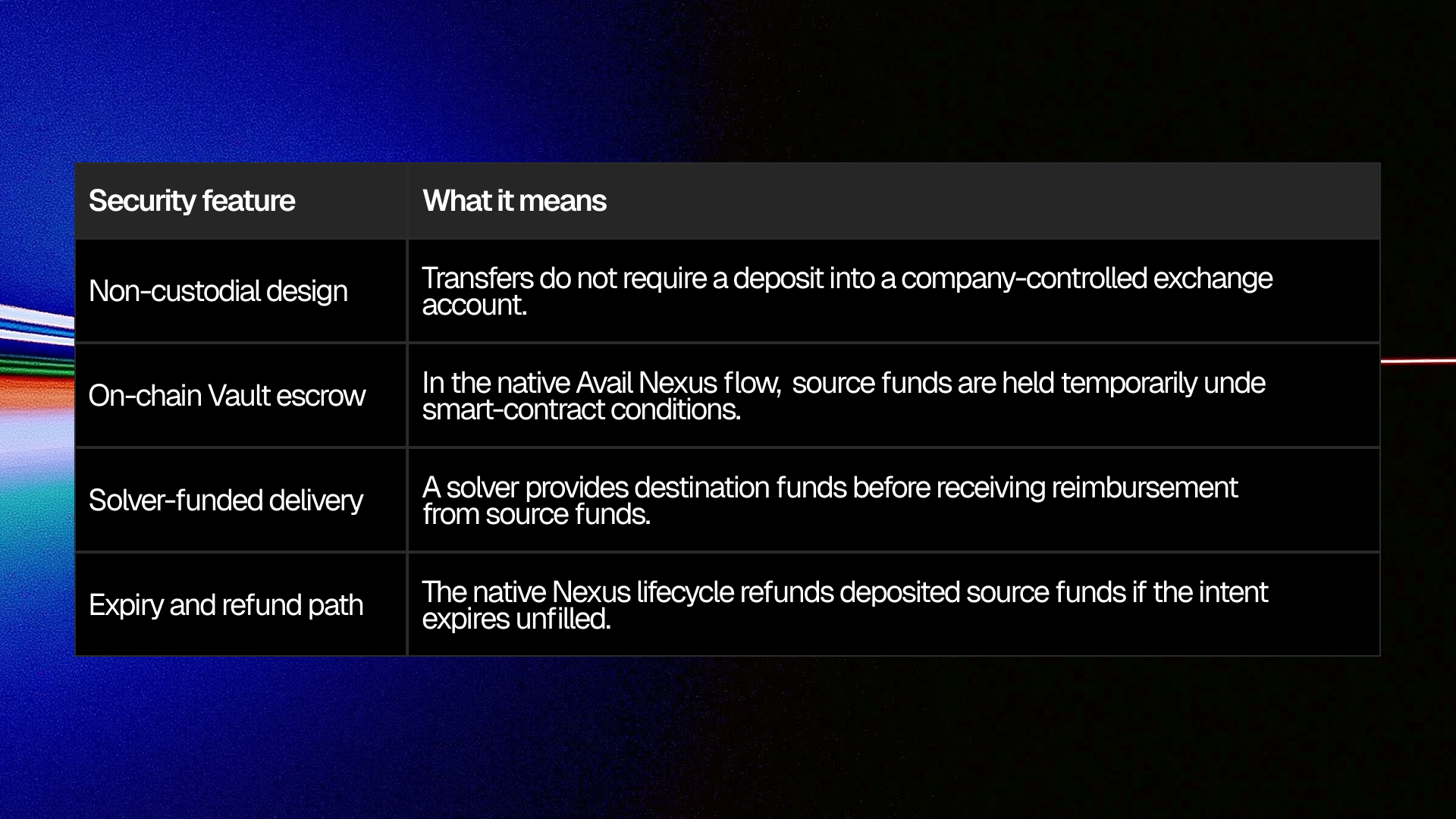
What non custodial means for your funds
FastBridge does not require you to deposit your assets into a company-controlled account. You connect your EVM-compatible wallet, choose the transfer you want to make and approve the operation.
Your source assets are then temporarily held in Vault smart contracts. These Vaults act as escrow: temporarily hold your funds while the transfer is in progress. The solver receives those funds as repayment only after the protocol verifies that the requested funds have been delivered to your destination.
Non-custodial means the transfer is governed by smart contracts rather than a centralized account from which you must request a withdrawal.
Read more: FastBridge safety guide
How FastBridge moves and protects your funds
1. Choose what you want to receive
You select the source tokens and chains, the destination chain and the token you want to receive.
The request you approve is called an intent. Think of it as the instructions for your transfer: which assets to use, what should arrive at the destination and what the fees will be.
For example, you might combine supported USDC balances on Arbitrum and Optimism to receive USDT on Base. Before approving, check both the amount you will receive and the total amount drawn from your source balances, including fees.
Read more: How Nexus intents work
2. Source funds enter escrow
After the required permissions and signed intent are in place, your source funds are deposited into the Nexus Vault contracts. This is where the funds are held while the transfer is carried out.
3. A solver delivers your destination funds
A solver is a market maker that provides liquidity for the transfer. It sends the requested funds on the destination chain using its own capital, then receives reimbursement through the protocol.
You receive your tokens on the destination chain before the solver is repaid. The protocol then verifies the completed transfer and reimburses the solver in the background.
4. Verified settlement releases reimbursement
Once the intent is fulfilled and the protocol verifies that you have received the requested funds on the destination chain, it releases your source funds from the Vault to repay the solver. This means the solver is repaid only after completing the transfer you approved.
Read more: Nexus transfer lifecycle
How Nexus verifies settlement
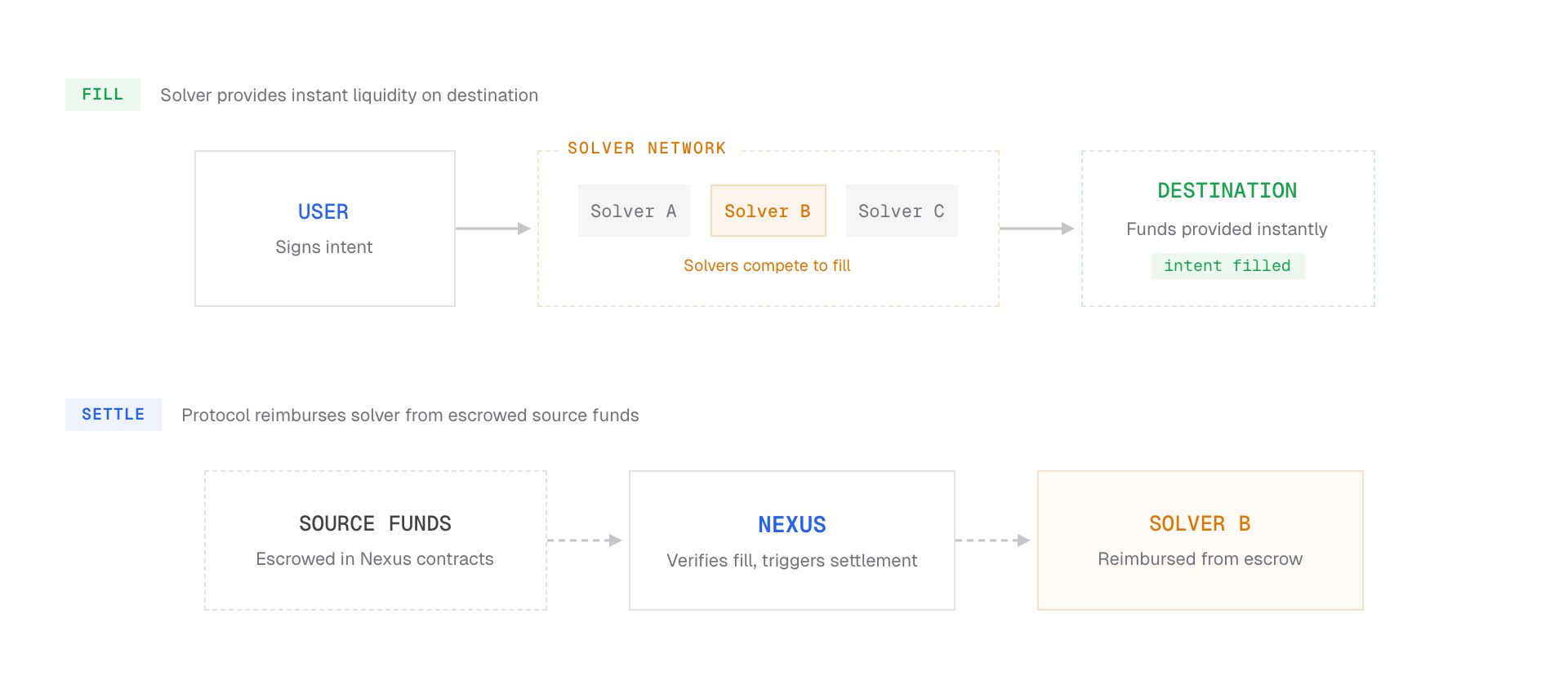
Nexus validators verify that the transfer was completed correctly before approving repayment to the solver. Each validator independently checks the transaction results. Approval requires signatures from a required number of validators, so a single validator cannot authorize repayment alone.
Once those checks are complete, the Vault contracts release the source funds to repay the solver. This protection depends on both the validators verifying transfers correctly and the smart contracts enforcing the release conditions.
Avail currently operates the Nexus solvers, with plans to decentralize the solver network over time. Solvers supply the funds you receive on the destination chain; validators verify the completed transfer before the protocol repays them.
Read more: Nexus solver and settlement architecture
What happens if your transfer does not complete
Every intent on Nexus protocol has an expiry. If no solver completes it before that expiry, the deposited funds are refunded on the source chains.
A transfer that appears delayed may still be in progress. Check its status and transaction details before starting another transfer. If you need support, keep the intent identifier and transaction hashes so the operation can be traced.
If a transaction fails before your funds enter the Vault, those funds remain in your wallet. If your funds have already been deposited into the Vault but the transfer is not completed, the intent must expire before the refund process returns them to the source chain.
Read more: Nexus transfer lifecycle
Why your wallet asks for an approval
Some tokens require an allowance before a contract can collect them for a transfer. This approval gives a specified contract permission to spend an amount of that token. It is separate from signing the intent that describes your transfer.
Depending on the token and permissions already in place, you may see an approval transaction or a permit signature in your wallet. Review the contract receiving permission and the amount being approved.
One coordinated transfer does not always mean one wallet prompt. Additional approvals can be required for the assets you select.
Read more: Token allowances
Security reviews and route providers
We publish Avail’s security audit reports so users and developers can inspect the work behind our infrastructure. The public repository includes a November 2025 Nexus Vault audit report.
A few checks before you bridge
FastBridge brings the transfer details together before you approve. Take a moment to check that they match the move you want to make.
- Open the official app at fastbridge.availproject.org/app and verify the domain.
- Confirm the destination chain, token and recipient address.
- Review the amount you want to send/receive, the fees and any swap price impact or slippage settings.
- Read the wallet approval and signature requests before confirming.
- Track the transfer and check that your funds have arrived. It usually takes 10-15 seconds.
As with any on-chain application, some risks remain. Networks can experience disruption, and the tokens you hold can lose value or face issuer restrictions. Swapping between different tokens can also introduce market and liquidity risk.
For a route you have not used before, a small first transfer can help you check the experience before moving a larger balance.
Read more: FastBridge FAQ
Understand your transfer before you approve
We built FastBridge so users can move multiple assets from multiple chains to their chosen destination in one transaction, without having to bridge one chain at a time, or swap one asset at a time.
You choose where your funds should go, review the details and authorize the transfer.
Behind the scenes, Avail Nexus coordinates escrow, destination delivery and verified settlement. Understanding those steps gives you a clear view of how your funds move and the protections built into the process.
→ Explore FastBridge